Domains & TLS
Your site is reachable the moment it is deployed — over the automatic name, with a certificate — and you can attach your own domains. The platform checks that a name really leads back to it before asking a CA for a certificate.
Two kinds of domain#
| auto | custom | |
|---|---|---|
| Name | <slug>.<alias>.<base_domain> |
anything you add, for example www.mysite.org |
| Created | with the project | with add custom domain |
| Removable | no (it goes with the project) | remove |
| Pre-check button | no (it runs on its own) | retry pre-check |
A name belongs to exactly one project
A hostname can be attached to one project, platform-wide. Names are stored lower-cased and trimmed, so Shop.Example.com and shop.example.com are the same name. Adding a name that any project already holds — yours or someone else's — is refused with 409.
Adding a custom domain#
- Point DNS at the platform.
Create an
Arecord for the name that resolves to the platform's public ingress address (your administrator can tell you which). - Add the domain.
On the project's Domains tab type the name into custom.example.com and press add custom domain — or call
add_domain/POST /projects/{id}/domains. - Watch the pre-check. It runs immediately. When it shows passed the route is written and a certificate is requested.
- Fix and retry if needed. After changing DNS press retry pre-check.
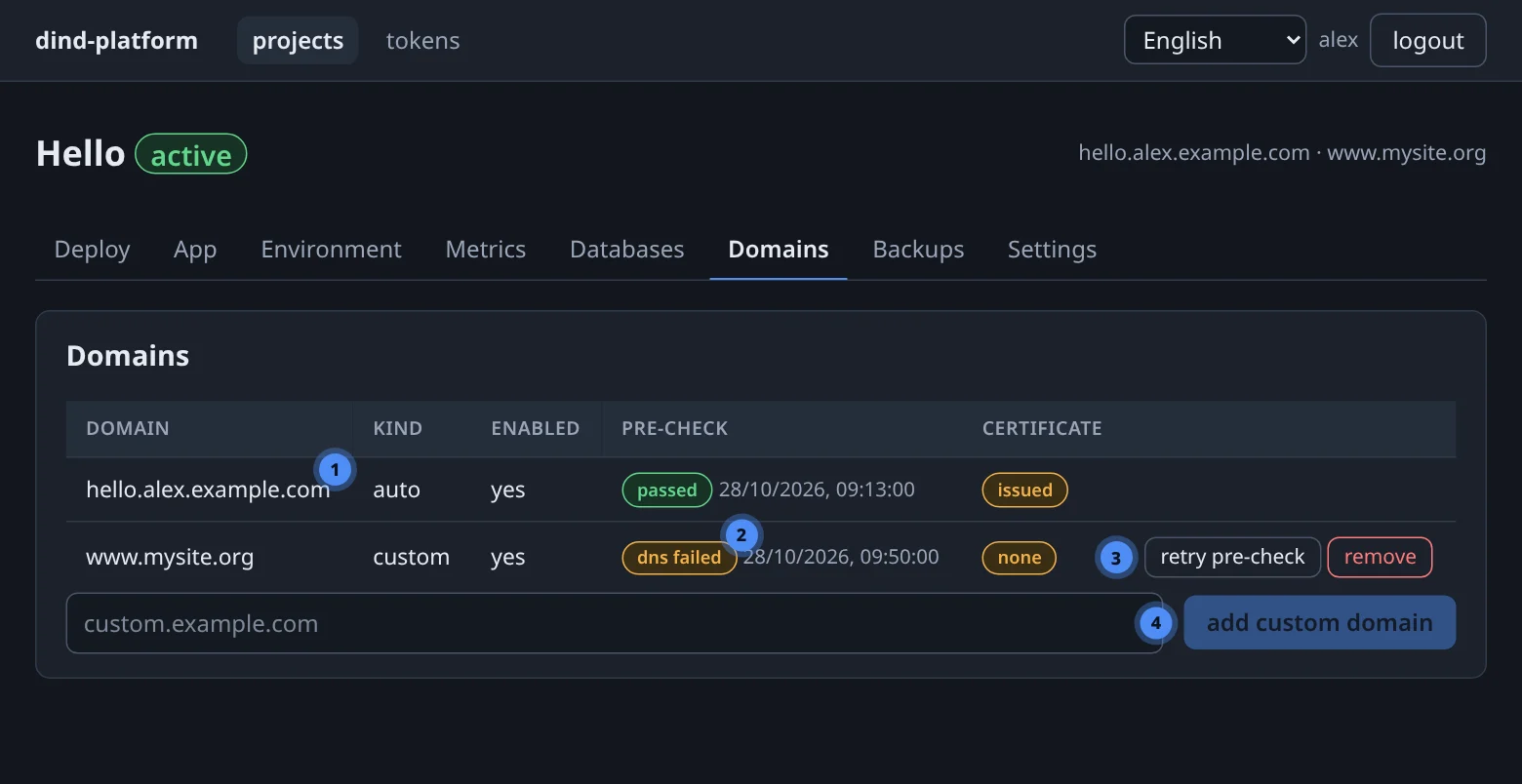
The pre-check#
Before any certificate is requested, the platform proves that the name leads back to itself. A wrong DNS record or a lookalike in front of the platform can therefore never cost you an ACME rate limit.
- DNS. The name must resolve. If the administrator has set the platform's public address (
lb_public_ip), the record must equal it; if not, "resolves" is enough. - Routing. The platform requests
http://<domain>/.well-known/platform/precheckthrough the real path — host egress, your public address, the ingress, Traefik. The answer must carry the platform's ownplatform_id.
Only then does the route file appear and TLS get enabled.
States#
| Pre-check | Meaning | What to do |
|---|---|---|
| pending | added, not checked yet | wait a few seconds |
| passed | DNS and routing both OK | nothing |
| dns_failed | the name does not resolve, or not to the platform's address | fix the A record, wait for DNS to propagate, retry |
| routing_failed | DNS fine, but the marker did not come back | check the ingress forwards ports 80 and 443 to the platform |
| Certificate | Meaning |
|---|---|
| none | no route yet (pre-check not passed) |
| pending | the CA challenge is running |
| issued | HTTPS is served |
| error | issuing failed; a watchdog retries and surfaces the reason |
A watchdog runs every five minutes: it verifies the route file and the router, checks that certificates are present and not expiring within 14 days, and re-runs failed pre-checks. Renewal itself is Traefik's job and automatic.
Certificates: dev or production#
The platform runs in one of two TLS modes, chosen by an administrator:
- dev — a local certificate authority signs a leaf certificate per domain. Browsers warn until the CA (
data/platform/traefik/certs/dev/ca.crt) is imported; DNS is simulated, the routing check is real. It exists for testing without public DNS or CA rate limits. - prod — certificates from an ACME CA (Let's Encrypt by default; ZeroSSL, Google Public CA or a custom server are options) using the HTTP-01 challenge. This needs port 80 to reach the platform and a real contact email. Wildcard certificates are not issued.
See Administration for how an admin selects the CA.
HTTP and HTTPS#
Plain HTTP requests are redirected to HTTPS once a domain has a certificate. Your app only ever sees plain HTTP from the platform — see Running your app.
Debugging a failed pre-check
dns_failed → check with dig +short your.domain from outside. routing_failed → from the same place, curl -i http://your.domain/.well-known/platform/precheck should return 200 and a JSON body with platform_id.