API tokens, REST & MCP
Everything in the console is also an API and an MCP tool. One token, three doors — with the same permissions as you.
API tokens#
A token lets a script, a CI job or an AI agent act as you — same projects, same permissions, same audit trail. Create one on the tokens page.
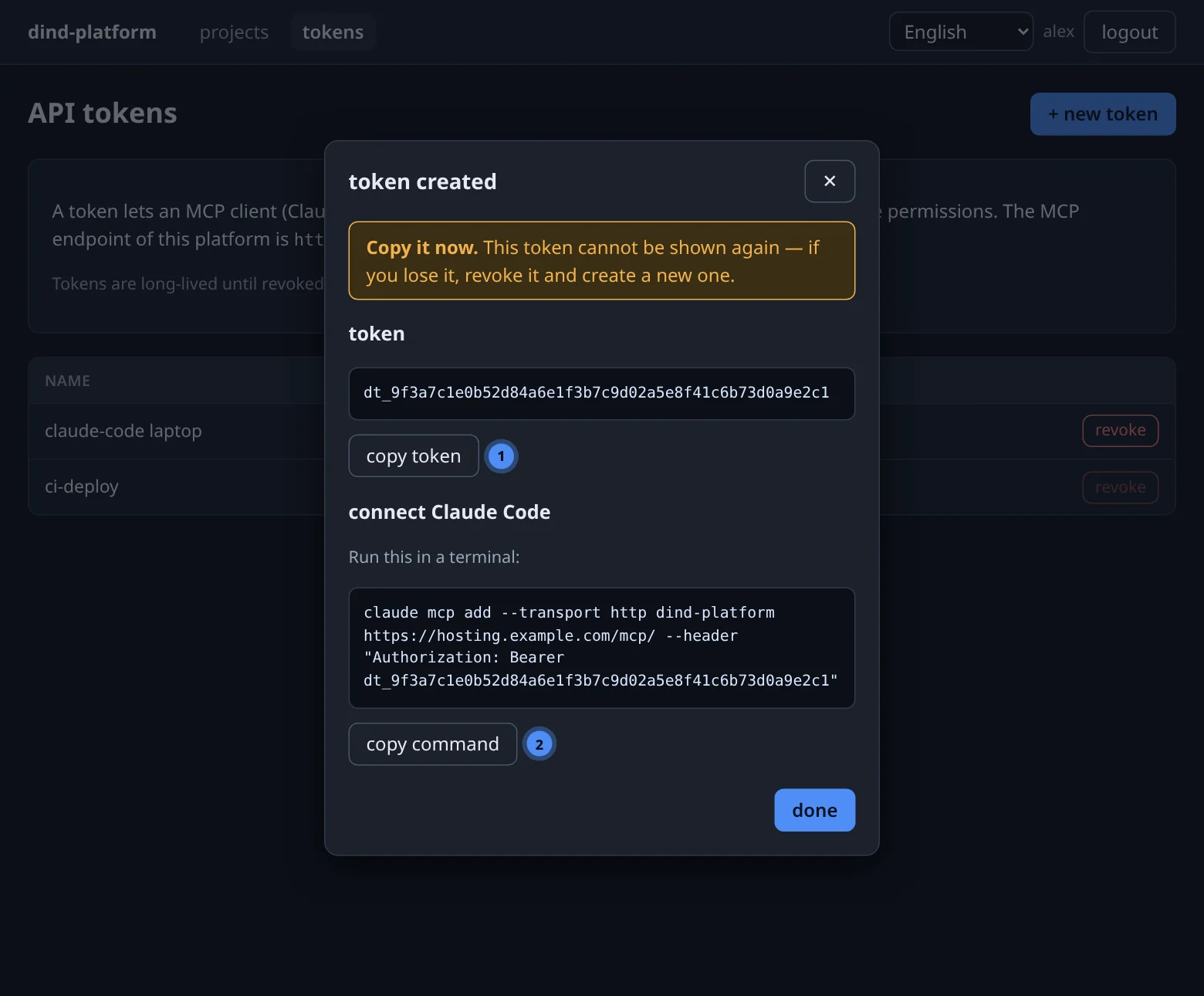
- Press + new token and name it after what uses it (
claude-code on my laptop,ci-deploy). - Copy the token (
dt_…) — only its hash is stored, so it is shown once. - Press revoke on the row when the machine or agent is retired; revocation takes effect on the next call.
| JWT access token | API token | |
|---|---|---|
| Obtained by | POST /api/v1/auth/login |
the tokens page or POST /api/v1/tokens |
| Lifetime | 8 hours | until revoked |
| Best for | the console, short scripts | agents and CI |
| Sent as | Authorization: Bearer <value> |
Authorization: Bearer dt_… |
Treat a token like a password
It sits in the client's configuration in clear text and gives full access to everything you own. Revoke tokens you no longer use; create one token per tool so you can revoke them individually.
The REST API#
Base path /api/v1, JSON bodies, bearer authentication. Project routes use the numeric project id. Long-running operations (deployments) answer 202 and are followed through their log; logs also stream as server-sent events.
| Area | Routes |
|---|---|
| Auth | POST /auth/login · GET /auth/me |
| Tokens | POST /tokens · GET /tokens · DELETE /tokens/{id} |
| Projects | GET /projects · POST /projects · GET /projects/{id} · DELETE /projects/{id} |
| Uploads | POST /projects/{id}/uploads (multipart file) · PUT /uploads/{token} (single-use link) |
| Deployments | POST /projects/{id}/deployments · GET /projects/{id}/deployments · GET /deployments/{id} · GET /deployments/{id}/logs?stream=1 |
| App | POST /projects/{id}/app/{start,stop,restart,recreate} · GET /projects/{id}/app · GET /projects/{id}/logs?tail=&follow=1 |
| Variables | GET /projects/{id}/env · PUT / DELETE /projects/{id}/env/{key} |
| Databases | POST / GET /projects/{id}/databases · GET / DELETE …/{name} · POST …/{name}/query · POST …/{name}/dump |
| Domains | POST / GET /projects/{id}/domains · DELETE …/{domain} · POST …/{domain}/precheck |
| Backups | POST / GET /projects/{id}/backups · POST /backups/{id}/restore · DELETE /backups/{id} |
| Storage · metrics | GET /users/me/storage · GET /metrics?scope=&range= |
| Admin | GET/POST /users · PATCH/DELETE /users/{id} · GET/PUT /admin/settings · maintenance routes |
| Health | GET /health |
Error conventions: 401 bad or missing credentials, 404 for anything that is not yours (never 403), 409 for a conflict such as a duplicate slug, 413 for an oversized upload and 422 for invalid input.
MCP: let an agent run it#
The platform exposes every capability as an MCP tool. Tools are thin wrappers over the same service layer as the console, so an agent is subject to exactly the same rules as you.
Connect Claude Code#
claude mcp add --transport http dind-platform https://<your-platform-host>/mcp/ \
  --header "Authorization: Bearer <dt_… token>"
Start claude and run /mcp — dind-platform should be listed as connected, with its tools. The tokens page shows this command ready to paste, with your host filled in.
Keep the trailing slash
The endpoint is /mcp/. Without the slash the server answers a redirect, and behind a TLS-terminating proxy that redirect can point to http:// and lose the authorisation header.
| Transport | Endpoint | Auth |
|---|---|---|
| streamable HTTP | https://<host>/mcp/ (or http://<host>:8900/mcp/ on the management port) |
Authorization: Bearer <token>, checked on every tool call |
| stdio | DIND_PLATFORM_TOKEN=<token> python -m app.mcp.stdio |
environment variable, for local agents |
The 33 tools#
Every project-scoped tool takes project as an id (from list_projects) or a slug. Admin-only tools fail for regular users with tool requires the admin role.
| Area | Tools |
|---|---|
| Platform | platform_health · get_metrics |
| Users (admin) | list_users · create_user · set_user_db_dind |
| Projects | list_projects · get_project · create_project |
| Domains | add_domain · domain_status · retry_precheck |
| Deploy | upload_archive · create_upload_url · deploy_app · list_deployments · deploy_logs |
| App | app_start · app_stop · app_restart · app_recreate · get_logs |
| Variables | list_env · set_env · unset_env |
| Databases | create_database · list_databases · drop_database · run_query · dump_database |
| Storage | get_s3_credentials |
| Backups | create_backup · list_backups · restore_backup |
A typical agent session#
DB_MAIN_* reached the app, and the first lines of get_logs show it listening on $PORT. Want me to add a custom domain?Deploys are asynchronous: the agent starts one and then polls list_deployments or reads deploy_logs until the status is running or failed. A failed deploy leaves the previous version running.
Uploading a bulky archive#
upload_archive sends the whole file inside one MCP request as base64, which the transport refuses above 4 MiB — practically about 3 MiB of archive. For anything bigger the agent takes a side door:
create_upload_url(project="myapp", filename="big.tar.gz")
  → {"upload_url": "https://<panel>/api/v1/uploads/upl_…", "method": "PUT",
     "expires_in_s": 900, "max_bytes": 536870912, "example_curl": "curl -sS -T big.tar.gz '…'"}

curl -sS -T big.tar.gz 'https://<panel>/api/v1/uploads/upl_…'
  → {"upload_id": "3f0c…e1.tar.gz", "size_bytes": 123456789}

deploy_app(project="myapp", source_type="archive", upload_id="3f0c…e1.tar.gz")
The URL is the credential — it needs no header — so it is deliberately limited:
- single use — the first request that presents it burns it, whatever happens next;
- short-lived — 15 minutes to start the request (a running transfer is not cut off);
- bound to one project, one file extension (
.zip/.tar.gz) and the user who asked; - it only stores a file — nothing is deployed until
deploy_appis called with the real token; - up to 512 MiB; the body streams to disk and is aborted as soon as it passes the cap.
Errors#
Tool errors come back as plain text with the MCP isError flag, never as stack traces: authentication failures, ownership (belongs to another user), domain states such as dns_failed, and service errors from deploys, backups and databases.
Give agents the least they need
Create a dedicated user (an admin can) for an automation that should only touch one set of projects, and give its token to the agent instead of your own.