Deploying
A deployment is one run of the pipeline: fetch, detect, build, run, record. This chapter shows each step, what you see while it runs and what to do when it stops.
Two ways to deliver code#
| Archive upload | Git repository | |
|---|---|---|
| Console | archive upload — choose a file | git repository — URL and optional ref |
| Formats | .zip, .tar.gz, .tgz |
any repository URL the platform can clone without a login prompt |
| Size | up to 512 MiB (archive and extracted tree) | shallow clone, --depth 1 |
| Version | exactly what you upload | the ref you name (branch or tag); empty = default branch |
| REST source | {"type":"archive","upload_id":"…"} |
{"type":"git","url":"…","ref":"main"} |
| MCP | upload_archive (small), create_upload_url (bulky) → deploy_app |
deploy_app(source_type="git", url=…, ref=…) |
Git cannot ask for a password
The clone runs non-interactively (GIT_TERMINAL_PROMPT=0). A repository that needs credentials must be reachable without a prompt. If it is not, upload an archive of the sources instead.
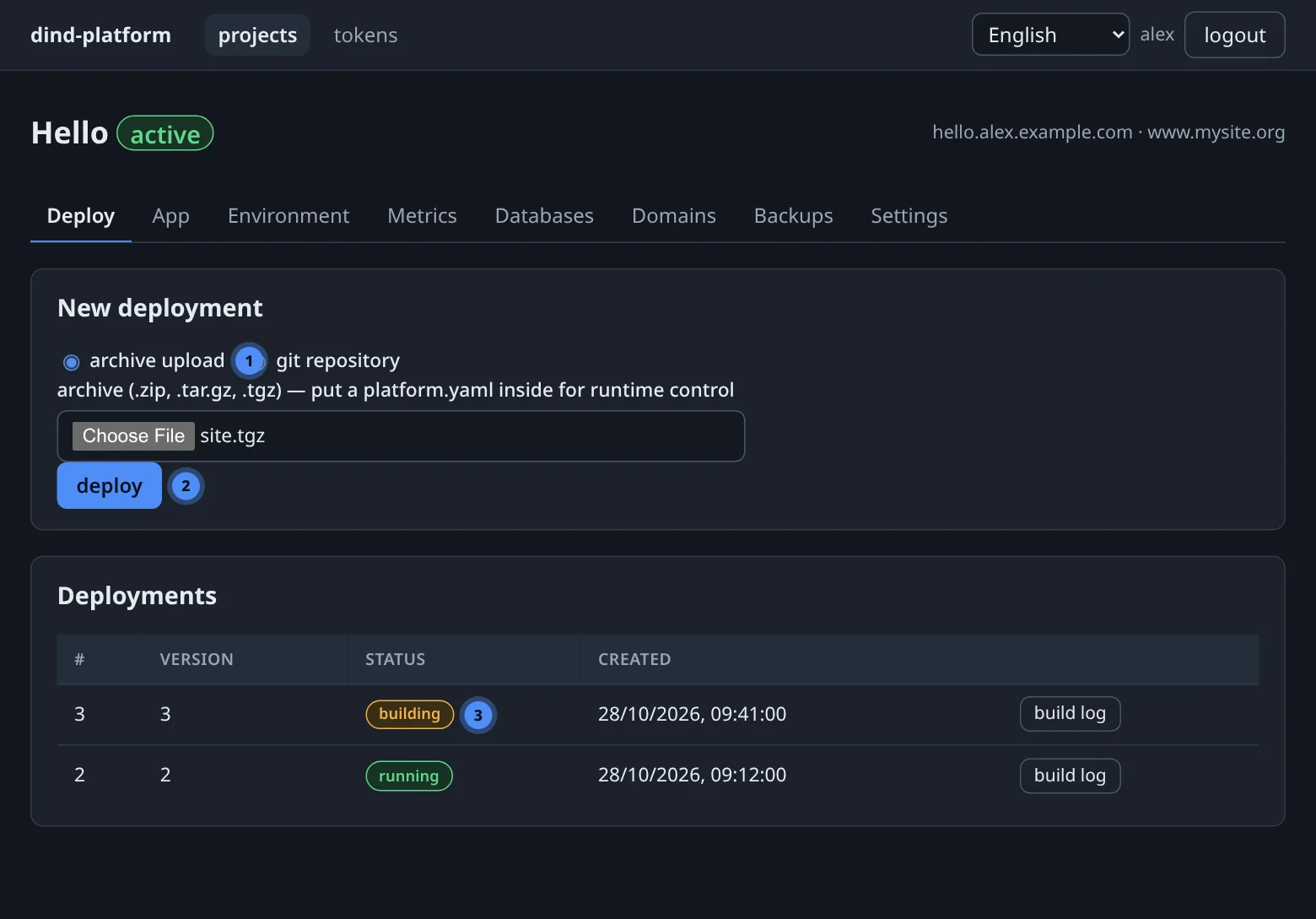
The pipeline#
- Fetchclone the repo or unpack the archive into a private build directory
- Detectread
platform.yaml; else guess the runtime from your files - Renderwrite a Dockerfile for that runtime
- Buildstream the context to your daemon and build the image
- Runreplace the app container; inject the environment
- Recordsave status, manifest and log; route the domain
Deployments are background jobs. The console, GET /deployments/{id}/logs?stream=1 (server-sent events) and the MCP tools list_deployments / deploy_logs all show the same live log until the job ends, and the stored log afterwards.
What is detected#
If there is no platform.yaml, the first matching file decides:
| File at the source root | Runtime |
|---|---|
package.json |
node |
requirements.txt or pyproject.toml |
python |
composer.json or public/index.php |
php |
index.html |
static |
Nothing matches? The deployment fails immediately and tells you what to add. Details of each runtime are in platform.yaml reference.
Reading the build log#
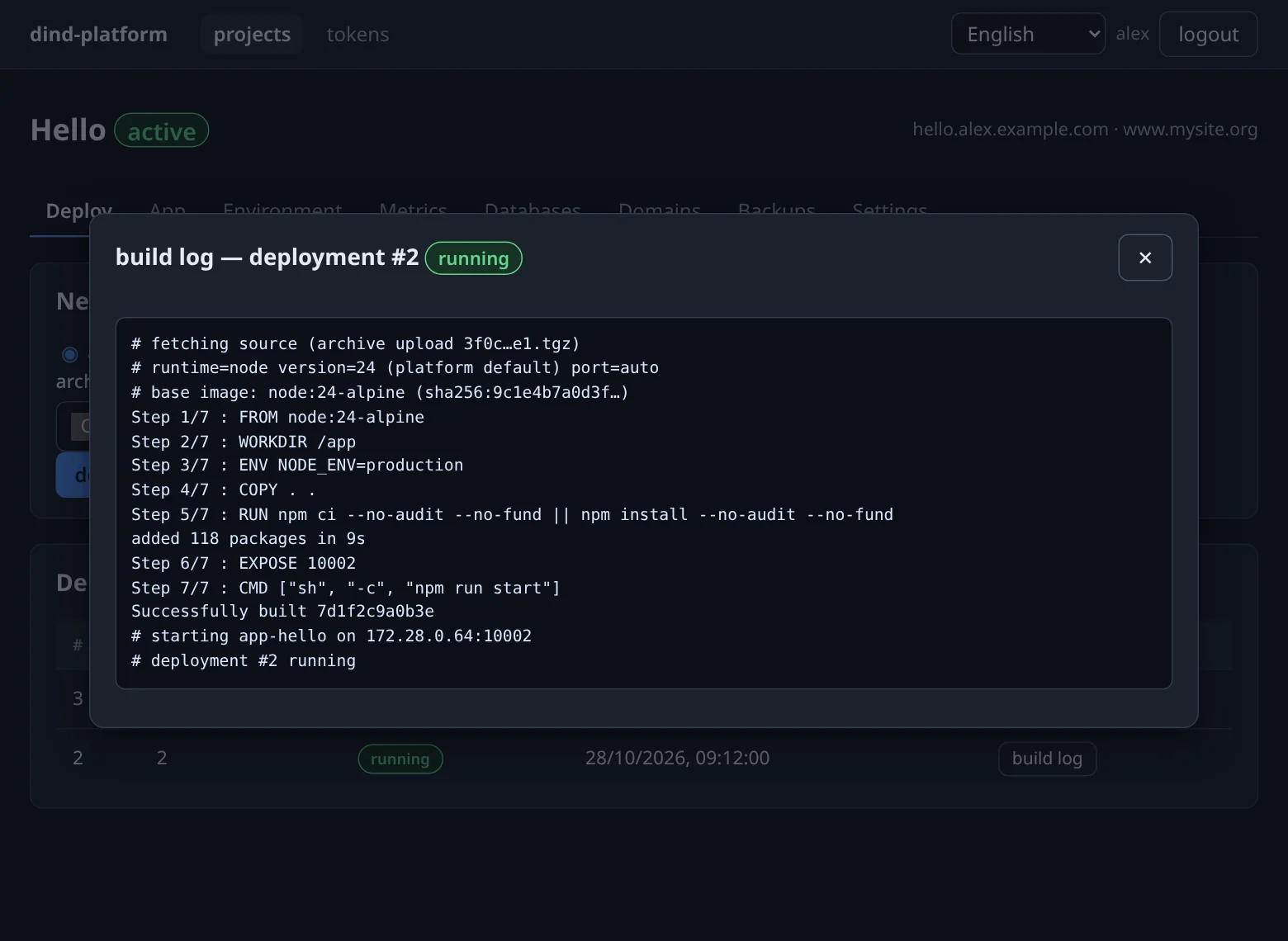
The three # lines at the top are the ones to read first:
# runtime=node version=24 (platform default) port=auto— the runtime, the version and where the version came from (platform.yaml, a hint file such as.nvmrc, or the platform default);# note: …— appears when a hint such asengines.node: ">=18"was found but ignored because it is a range;# base image: node:24-alpine (sha256:…)— the exact image the build started from.
Statuses#
| Status | Meaning |
|---|---|
| queued | accepted, waiting for its turn |
| fetching | cloning or unpacking the source |
| building | image build in your daemon (the longest step) |
| running | the new container is up; this version is live |
| failed | stopped with an error — it is shown above the log |
When a deployment fails#
The old app is replaced only after the new image has been built, so a failed fetch, detect or build leaves the previous version running. Open build log — the error is at the top of the dialog and at the end of the log.
| Message (shortened) | Cause | Fix |
|---|---|---|
cannot autodetect runtime… |
none of the detection files at the source root | add platform.yaml with runtime:, or fix the archive layout (zip the contents, not the parent folder) |
platform.yaml is invalid … unknown key |
a typo — unknown keys are rejected on purpose | fix the key named in the message |
python runtime: set 'start_cmd'… |
no main.py / app/main.py |
set start_cmd |
node runtime: no start command |
no start script and no server.js / index.js |
add a start script or start_cmd |
cannot pull base image … is that version published? |
version: names a release that does not exist |
use an existing major/minor, see versions |
archive too large (> 512 MiB) |
upload or extracted size over the cap | drop node_modules, build output and media |
interrupted by management restart |
the platform was upgraded or restarted mid-build | just deploy again |
Redeploying and going back#
- Deploy again with the same or a new source — each run is a new numbered deployment and image (
platform/<slug>:<version>-<sha8>). - Going back means deploying the older source again: an older git ref (tag it!) or the older archive. There is no one-click rollback button.
- A deploy replaces the container, so expect a short interruption while the new one starts. Data in declared volumes and in databases is untouched.
Pin what you ship
Deploy from a git tag and pin version: to a full x.y.z for builds that must be reproducible. A short version follows the newest matching release and is refreshed on every deploy.
Bulky archives (100 MB and up)#
upload_archive carries the file inside one MCP request and is limited to about 3 MiB. For anything bigger an agent asks for a single-use upload link, PUTs the file to it from a shell, then deploys the returned upload_id. Mechanics and limits are in API tokens, REST & MCP.