Your own cloud platform, built from nested Docker daemons.
Deploy Node.js, Python, PHP and static apps from git or an archive. Attach PostgreSQL or MySQL, get HTTPS domains, S3 storage, backups and metrics — and run it all from a web console, a REST API, or an AI agent.
Everything a small PaaS needs, nothing you have to assemble.
One platform replaces a pile of glue: a build pipeline, a load balancer with certificates, databases with a console, object storage, backups and metrics — with tenants kept apart.
Deploy from git or an archive
Point at a repository or upload a .zip/.tar.gz up to 512 MiB. The runtime is detected; the build streams live; a failed build never replaces the running app.
Pick the runtime version
version: "22" builds on the newest 22.x and refreshes on every deploy; "22.12.1" stays pinned. Defaults: Node 24, Python 3.12, PHP 8.5, nginx 1.27.
PostgreSQL & MySQL
A database per project with generated credentials injected as DB_* variables, a guarded SQL console, and dumps on demand.
Domains & automatic HTTPS
Every project gets slug.alias.domain at once. Add your own names; a pre-check proves they lead back to you before any certificate is requested.
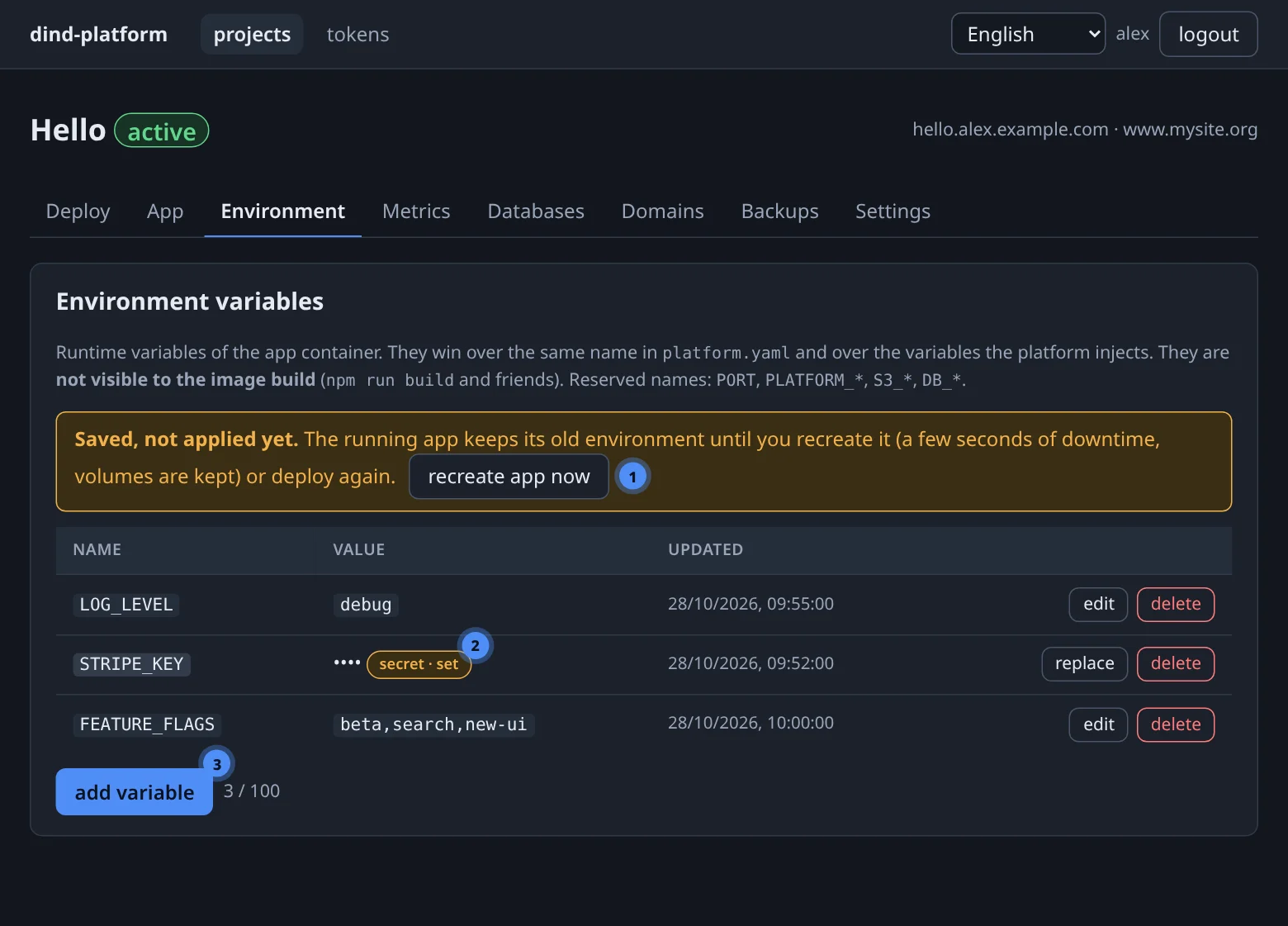
Variables & write-only secrets
Three-layer environment with encrypted secrets nobody can read back — set from the console, REST or an agent, applied with one recreate.
Environment →S3 object storage
A personal bucket and scoped keys on the built-in MinIO, injected as S3_* with a single line in the manifest.
Backups & one-click restore
Database dumps, volume tars and the source archive in one project backup — with retention, checksums and a guard on destructive restores.
Backups →Metrics, logs and audit
CPU and memory per container every 15 seconds, live app and build logs, and an audit row for every change.
Metrics & logs →A daemon per user
Apps are built and run by a Docker daemon only their owner uses. Databases are separate containers with their own credentials.
Core concepts →REST API
Everything the console does, scriptable with curl and an API token — ideal for CI pipelines and preview environments.
MCP server for AI agents
33 tools let Claude Code or any MCP client create projects, deploy, query databases and manage domains — under your permissions.
MCP →Self-healing
After a reboot or crash a reconciler restores the stack — daemons, routes, containers — without touching your data.
Operations →From source to a live HTTPS site in three moves.
The same flow in the console, over REST, or from an agent.
Create a project
Choose a slug and a base domain. The site name slug.alias.domain is reserved immediately.
Deploy your source
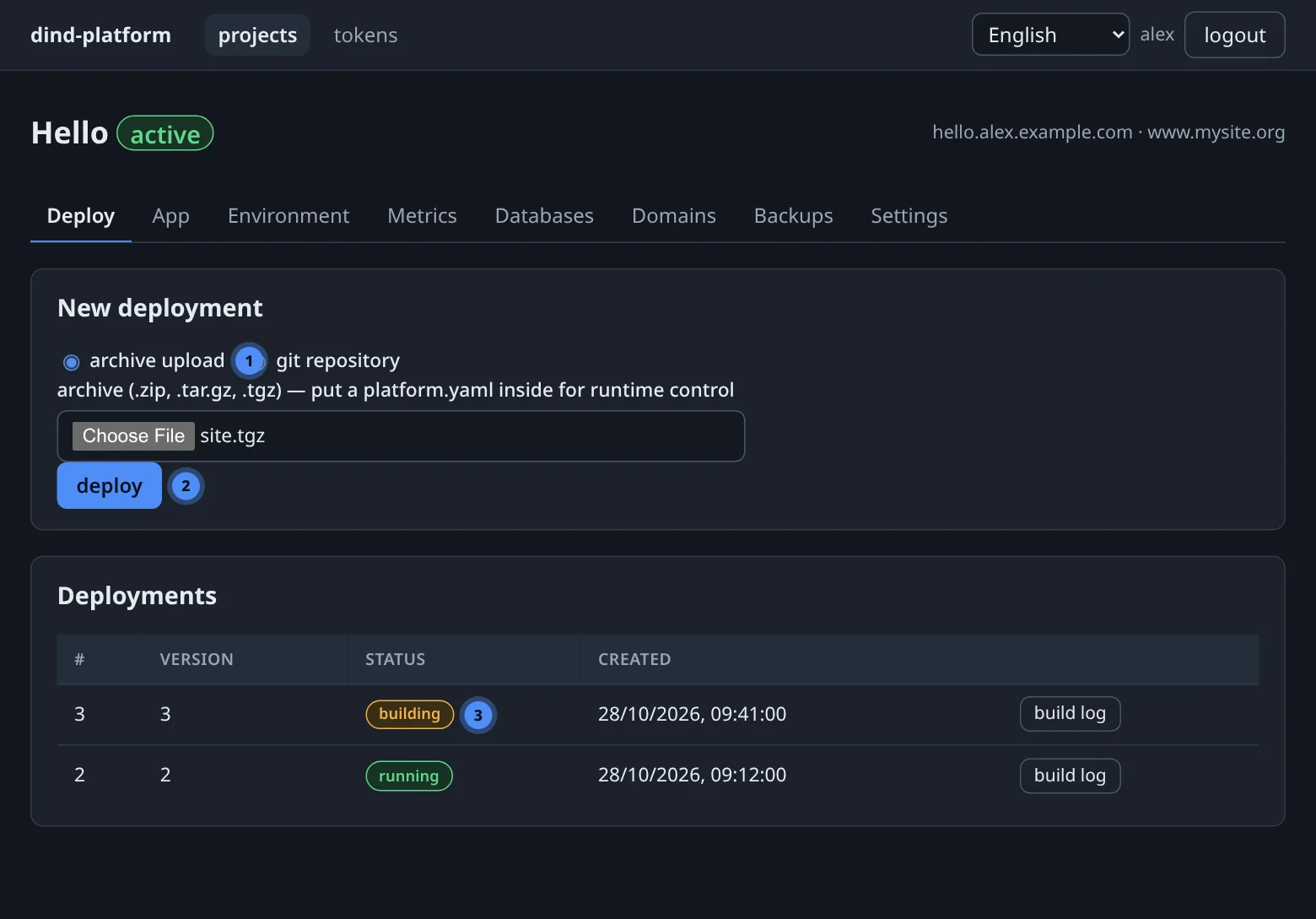
Upload an archive or give a git URL. The platform detects the runtime, builds the image in your daemon and starts it.
It is live
Traefik routes the name, the pre-check passes, a certificate is issued — and renewed — automatically.
Press + new project, open its Deploy tab, pick an archive and press deploy.
PID=$(curl -fsS -X POST $BASE/api/v1/projects -H "Authorization: Bearer $TOKEN" \
  -H 'Content-Type: application/json' \
  -d '{"slug":"hello","display_name":"Hello","base_domain":"example.com"}' | jq .id)

UP=$(curl -fsS -X POST $BASE/api/v1/projects/$PID/uploads \
  -H "Authorization: Bearer $TOKEN" -F file=@site.tgz | jq -r .upload_id)

curl -fsS -X POST $BASE/api/v1/projects/$PID/deployments \
  -H "Authorization: Bearer $TOKEN" -H 'Content-Type: application/json' \
  -d "{\"source\":{\"type\":\"archive\",\"upload_id\":\"$UP\"}}"
One privileged container. A daemon for every tenant.
The host runs a single dind-hosting container and publishes nothing. Inside it, platform services and per-user Docker daemons share a private network and talk over unix sockets.
One address, no published ports
The platform is reached at 10.10.10.10 on a host bridge. What your firewall forwards there is your decision; the Docker API has no TCP listener.
Isolation that matches the tenant
Apps run in the owner's daemon, sources are streamed per deploy (never mounted), and every database has its own container and credentials.
Reproducible and recoverable
Everything durable is one data/ directory. A reconciler re-asserts the desired state on every boot, so recovery is make up.
Four runtimes, detected from your files.
No Dockerfile to write. Add an optional platform.yaml to choose a runtime, pin a version, attach a database or change how the app starts.
static
- base
nginx1.27- detected
index.html- extras
- SPA fallback, gzip
node
- base
node24 LTS- detected
package.json- runs
npm ci→ build →npm start
python
- base
python3.12- detected
requirements.txt- runs
pip install→ uvicorn /start_cmd
php
- base
php8.5 fpm + nginx- detected
composer.json- runs
- Composer install, supervisor
A manifest is optional — and small.
Everything below is a default you can override. Unknown keys are rejected, so a typo fails loudly instead of silently doing nothing.
runtime: node
version: "24"        # quote it: "3.10" must not become 3.1
databases: [main]    # injects DB_MAIN_* variables
s3: true             # injects S3_* variables
resources: {cpu: "1.0", memory: 512m}
volumes:
  - {name: uploads, path: /app/uploads}
Click it, script it, or just say it.
The console, the REST API and the MCP server all call the same service layer — the same authorisation, limits and audit trail. Create an API token once and hand it to a script or an agent.
DB_MAIN_* reached the app and it is listening on its port. Shall I attach a custom domain?What people build on it.
Sites & single-page apps
Ship a built SPA with runtime: static, spa: true — nginx, gzip and a certificate, in one upload.
APIs & back-ends
Node.js and Python services with a PostgreSQL or MySQL database, secrets and S3 for files.
PHP applications
Composer-based apps served by php-fpm behind nginx, with a persistent volume for storage.
Internal tools
Admin panels and dashboards that need a database and a login — hosted on your own hardware, on your own domain.
Agent-driven deploys
Tell Claude Code to create the project, set the variables, deploy and read the logs. Every step is audited and under your permissions.
Preview environments
Let CI create a project per branch over REST, deploy a tag, post the URL, and delete it when the branch is merged.
Safe defaults, visible behaviour.
Secrets stay secret
Secret variables are encrypted and write-only: no console, REST, MCP, log or audit row ever returns one.
Ownership, not “forbidden”
Anything that is not yours answers not found, so existence is never leaked — in the console, the API and MCP alike.
Pre-check before certificates
The platform proves a name leads back to itself before asking a CA — no wasted rate limits on a wrong DNS record.
Guarded SQL console
One statement, a 30-second timeout, 1 000 rows or 1 MiB — and every execution lands in the query log.
Single-use upload links
Big archives bypass MCP via a 15-minute, one-shot PUT link bound to one project and one extension.
Audit for every change
Who deployed, recreated, changed a variable or restored a backup — recorded, without ever recording a secret.
What it is not — yet.
DinD Hosting is a deliberately small, single-host platform. These are known edges of this version:
- Single host — no multi-host or Kubernetes mode.
- One app per project — create another project for another service.
- Admin-managed users — no self-registration or SSO.
- Backups are on demand — no built-in schedule.
- HTTP-01 certificates only — no wildcard certificates.
- No one-click rollback — redeploy an older tag or archive.
- No public database ports — use the SQL console, dumps, or your app.
- No built-in alerting — metrics are viewable, not alarmed.
Ready to deploy something?
The quick start takes about five minutes: a login, a project and an archive. The manual has a chapter for everything after that.